English
 Español
 Français
 Deutsch
 العربية
 Português
 Italiano
 Polski
If you develop on Windows, sooner or later you land on the same fork in the road: Visual Studio Professional or Visual Studio Enterprise? They install the same core IDE, open the same solutions and compile the same code, yet Microsoft lists Enterprise at several times the price of Professional. That gap makes a lot of developers wonder whether they are missing out on something essential, or simply paying for tools they will never open.
This guide breaks down exactly what separates the two editions of Visual Studio 2022, who genuinely benefits from Enterprise, and how the decision changes when both keys happen to cost the same. No hype and no scare tactics — just the honest differences so you can pick the right one and get back to writing code.
⭐ Key Takeaways
- Visual Studio 2022 ships in three editions: Community (free, with eligibility limits), Professional and Enterprise.
- Professional is the full paid IDE — everything a working developer needs for day-to-day building, debugging and shipping.
- Enterprise layers on advanced tooling: IntelliTrace, Snapshot Debugger, Live Unit Testing, IntelliTest, Microsoft Fakes and architecture tools like Code Map and Live Dependency Validation.
- Only large teams with serious testing, profiling and architecture-governance needs truly require Enterprise.
- Since both keys are $19.99 here, Enterprise is the better value pick — more capability for the exact same price.
Community vs Professional vs Enterprise
Before you compare Professional and Enterprise, it helps to know where the free Community edition fits. Community is a full-featured IDE, but its license restricts who can use it: it is meant for individual developers, open-source projects, academic use and small teams. Larger organizations do not qualify for Community and must move up to a paid edition.
Professional and Enterprise both remove those licensing limits and give you a supported, commercial IDE. The difference between them is not the editor or the compiler — it is the depth of the advanced diagnostics, testing and architecture tooling bundled on top. Here is how the three lines up:
| Capability | Community | Professional | Enterprise |
|---|---|---|---|
| Core IDE, editor, debugger, Git | Yes | Yes | Yes |
| Commercial use for larger orgs | Restricted | Yes | Yes |
| CodeLens | Limited | Yes | Yes |
| IntelliTrace & Snapshot Debugger | No | No | Yes |
| Live Unit Testing, IntelliTest, Microsoft Fakes | No | No | Yes |
| Code Map & Live Dependency Validation | No | No | Yes |
| Test management & load-testing history | No | No | Yes |
Read that table from the top down and a pattern appears: for the everyday work of writing, debugging and shipping software, Professional and Enterprise are functionally the same. The whole Enterprise premium is concentrated in the advanced diagnostics and testing rows near the bottom.
What Enterprise actually adds
Enterprise is best understood as Professional plus four families of high-end tooling. If none of these describe problems you have today, you are looking at features that will sit unused.
Advanced debugging and profiling
IntelliTrace records your application’s execution so you can step backward through historical events instead of reproducing a bug from scratch — invaluable when a defect only surfaces once in a hundred runs. The Snapshot Debugger lets you capture the state of a live app (including in production-like environments) without stopping it, so you can inspect a misbehaving service without taking it down.
Advanced testing
Live Unit Testing runs your tests continuously as you type and shows pass/fail indicators inline in the editor. IntelliTest generates test cases and input data automatically by analyzing your code paths. Microsoft Fakes provides a shimming and stubbing framework for isolating components in tests, and Enterprise also carries the richer test management and load-testing history features aimed at large QA processes.
Architecture and code analysis
Enterprise adds dependency validation and Live Dependency Validation, which let you define architectural rules (for example, “the data layer must not reference the UI layer”) and get warned the moment code violates them. Code Map visualizes relationships across a large solution so you can reason about a sprawling codebase you did not write yourself.
Higher-end enterprise features
On top of the tooling, Enterprise is positioned as the edition for organizations that need the broadest capability set and the associated higher-tier benefits. These are the kinds of features that matter to a hundred-developer shop and are essentially invisible to a solo builder.
Who really needs Enterprise
Be honest with yourself about your daily workflow. Enterprise pays off when you can answer “yes” to several of these:
- You work on a large team or a large codebase where architectural drift is a real, recurring problem.
- You need to debug intermittent or production-only bugs that are painful to reproduce, making IntelliTrace and the Snapshot Debugger worth their weight.
- Your team runs a serious automated testing practice and would genuinely use Live Unit Testing, IntelliTest and Microsoft Fakes.
- You must enforce architecture rules across many contributors with dependency validation.
If instead you are a freelancer, an indie developer, a startup engineer or a small team shipping web and desktop apps, Professional almost certainly covers everything you touch. Plenty of professional developers spend entire careers in Professional (or even qualify for free Community) and never miss a single Enterprise feature. Paying Microsoft’s full Enterprise premium for tools you will not open is simply wasted budget.
Since both keys are $19.99, which to pick
Here is where the usual advice flips. The reason most guides steer solo developers toward Professional is price — at Microsoft’s retail rates, Enterprise costs many times more, so you only pay that premium if you will use it. That is sound logic when the two editions have very different price tags.
But at SoftKeys, both the Professional and Enterprise lifetime keys are the same $19.99. When the price is identical, the calculus changes: there is no premium to justify, so choosing Enterprise simply gets you more capability for the same outlay. Even if you only ever occasionally reach for IntelliTrace or Live Unit Testing, having them available at no extra cost is pure upside.
The one caveat worth stating plainly: extra features you never touch add nothing to your actual productivity, and Enterprise is a heavier install. If you value a leaner setup and know you will never need the advanced suite, Professional is a perfectly rational, fully capable choice. But if you are on the fence and the cost is equal, Enterprise is the sensible default here.
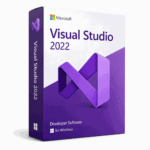
📦 Genuine Visual Studio 2022 Keys
How the lifetime key works
A lifetime key is a one-time purchase that stays valid for the version you buy — there is no monthly or annual renewal. You download the standard Visual Studio 2022 installer directly from Microsoft, install the edition you purchased, and activate it with the genuine product key you receive from SoftKeys.
The process is straightforward: complete checkout, receive your key by email, run the Microsoft installer, and enter the key when prompted to unlock and license your edition. Because you are installing Microsoft’s own software, you get genuine updates and the full, unmodified IDE experience. A 1-PC key licenses a single machine; the 2-PC Enterprise option is there if you need to license two computers.
Frequently Asked Questions
Is Visual Studio Professional enough for most developers?
Yes. For freelancers, indie developers, startups and small teams, Professional includes the complete IDE, debugger and everything needed to build and ship software. The features Enterprise adds are advanced testing, profiling and architecture tools that most individual developers never use.
What is the real difference between Professional and Enterprise?
They share the identical core IDE. Enterprise adds advanced debugging and profiling (IntelliTrace, Snapshot Debugger), advanced testing (Live Unit Testing, IntelliTest, Microsoft Fakes, test management and load-testing history), and architecture and code-analysis tools (dependency validation, Code Map, Live Dependency Validation).
Should I buy Enterprise if both keys cost $19.99?
If the price is the same, Enterprise gives you more features for the same money, so it is the sensible default. The only reason to still choose Professional is if you prefer a lighter install and are certain you will never need the advanced tooling.
Is Community edition an option instead of paying?
Community is free but license-restricted: it is intended for individual developers, open-source work, education and small teams. Larger organizations do not qualify and need a paid Professional or Enterprise license.
Are these keys genuine and how do they activate?
Yes, they are genuine product keys. You install the official Visual Studio 2022 installer from Microsoft and activate with the key you receive, which licenses the edition you purchased and delivers the full, unmodified IDE with genuine updates.
Does a lifetime key expire or need renewal?
No. A lifetime key is a one-time purchase for the version you buy, with no monthly or yearly renewal. A 1-PC key covers one machine, while the 2-PC Enterprise option licenses two computers.
Final thoughts
Under Microsoft’s normal pricing, the Professional-versus-Enterprise decision is mostly about whether you will actually use Enterprise’s advanced testing and architecture suite — because you pay a steep premium for it. Solo developers and small teams should default to Professional; large teams that lean on IntelliTrace, Live Unit Testing and dependency validation are the ones who get their money’s worth from Enterprise. When both lifetime keys cost the same $19.99, though, the tie-breaker is simple: Enterprise hands you the fuller toolset at no extra cost, so choose Professional only if you truly prefer the leaner setup. Either way, you get the genuine Visual Studio 2022 IDE for a fraction of the retail price.