English
 Español
 Français
 Deutsch
 العربية
 Português
 Italiano
 Polski
Bluebeam Revu is the PDF tool the construction and engineering world actually runs on — takeoffs, drawing markups, punch lists and full sheet sets all live inside it. Once you own a genuine Revu eXtreme 20 license, the only thing standing between you and a working copy is activation: turning your Serial Number and Produto Key into a registered, fully-unlocked install.
This guide walks through the whole thing — the normal online activation, the offline (manual) method for locked-down site networks, and the handful of errors people run into — so you can be marking up drawings in a couple of minutes.
⭐ Key Takeaways
- Revu perpetual licenses activate with two codes: a Serial Number and a Produto Key.
- The registration screen appears on first launch — or reach it any time from Revu’s Help > Register.
- Online activation takes seconds; offline (manual) activation is available for air-gapped PCs.
- One perpetual license = one seat — you can unregister and move it to a new computer.
- eXtreme is the top edition, adding scripting, batch OCR, PDF forms and PDF/A over CAD and Standard.
Before you start •
Step-by-step activation •
Offline (manual) activation •
Common errors & fixes •
Where to buy a genuine key •
Perguntas Frequentes
What you need before activating
Have these three things ready and the whole process takes about a minute:
- Your Serial Number and Produto Key — emailed to you right after purchase.
- The Revu eXtreme 20 installer — download it from Bluebeam’s official site (bluebeam.com).
- A Windows PC (Revu 20 is Windows-only) with an internet connection for the fastest activation.
A quick note on editions: Revu 20 shipped as Standard, CAD and eXtreme. eXtreme is the complete version — it unlocks scripting, batch OCR, PDF forms, redaction and PDF/A. Your key activates the edition you bought, so an eXtreme key gives you every feature.
How to activate Bluebeam Revu eXtreme 20 (step by step)
Follow these steps in order:
- 1. Install & launch. Run the installer, choose your language, finish setup, then open Bluebeam Revu.
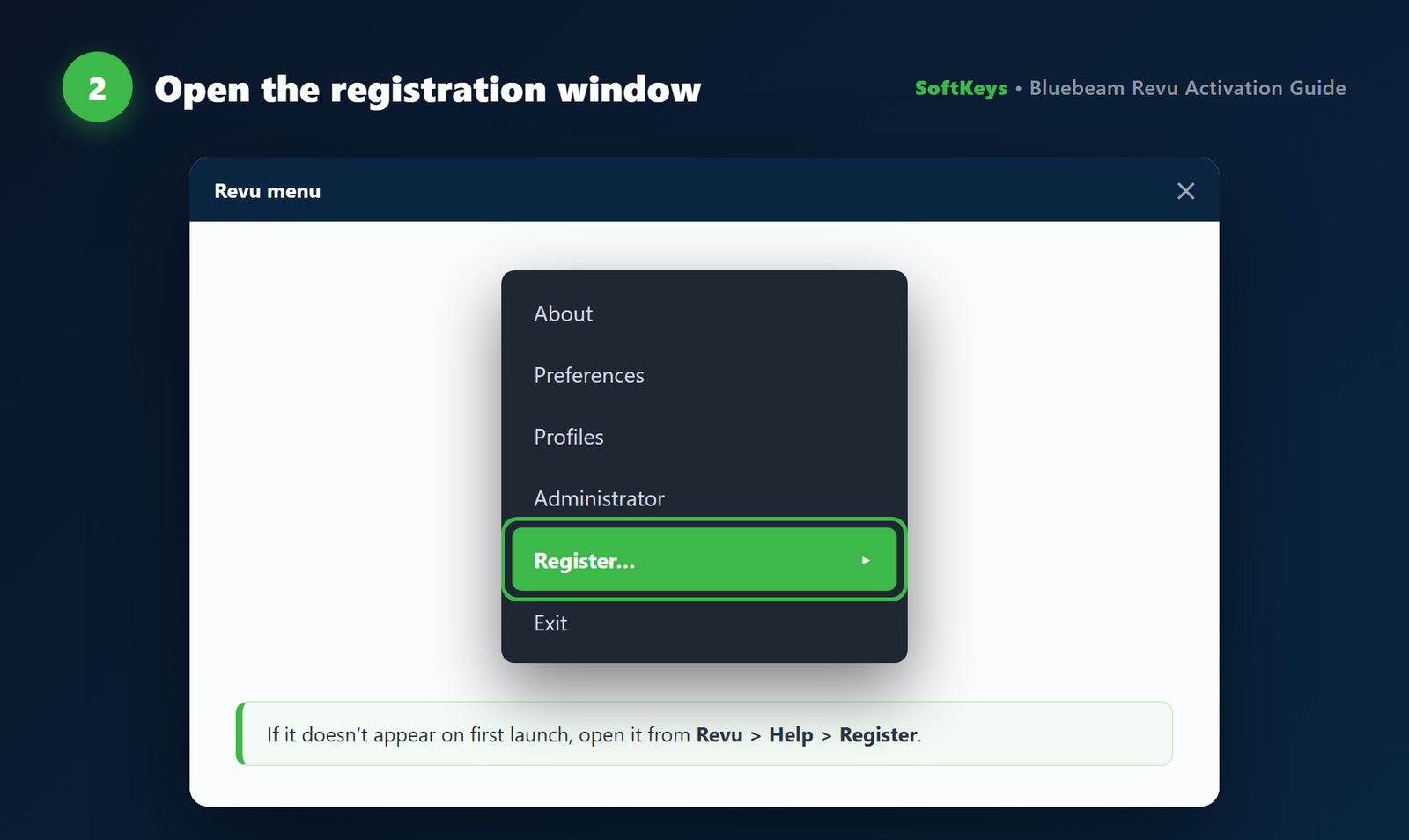
- 2. Open the registration window. On first launch Revu shows “Register Bluebeam Revu” automatically. If it doesn’t appear, click the Revu menu > Help > Register.
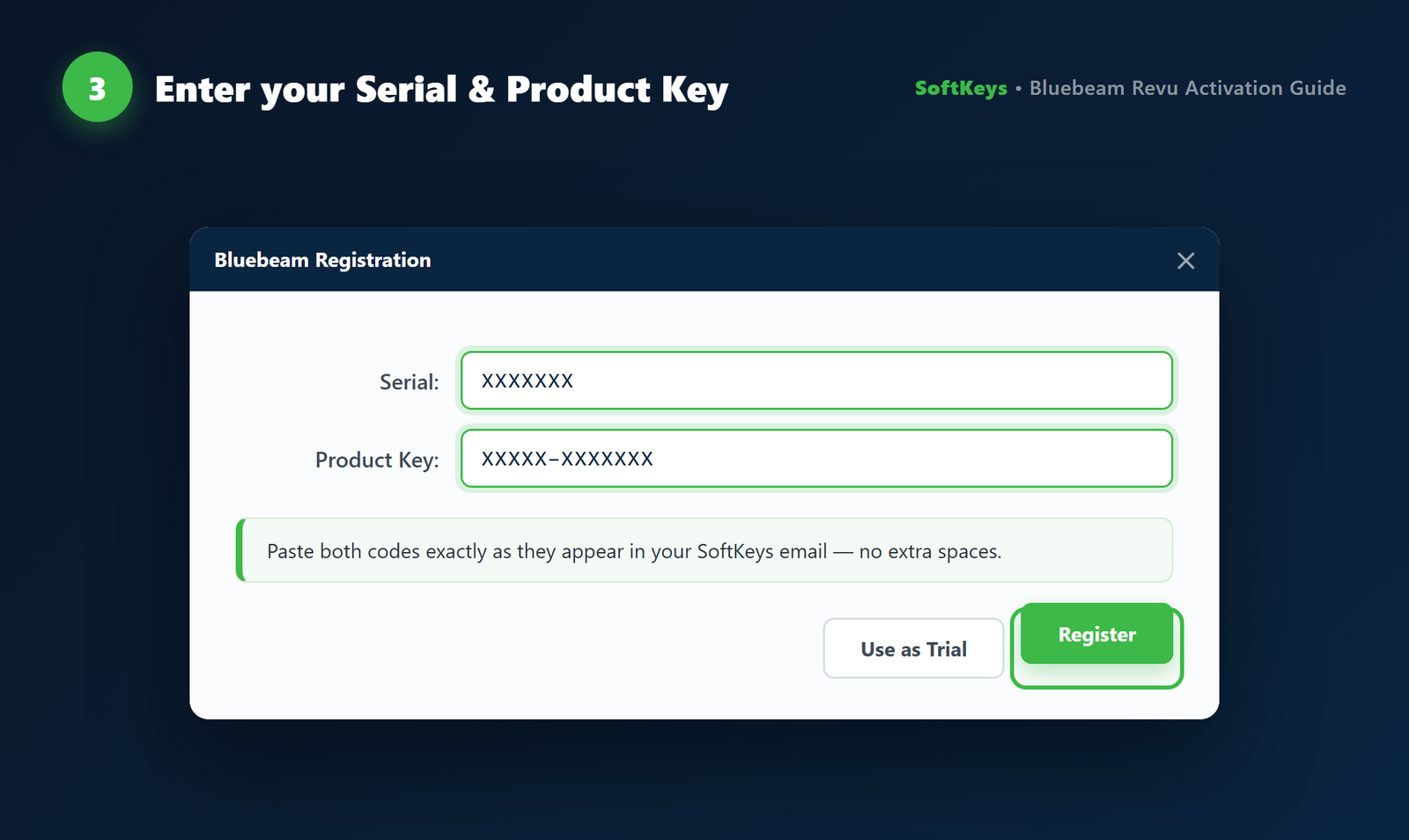
- 3. Enter your codes. Type the Serial Number and Produto Key exactly as they appear in your email. They aren’t case-sensitive, but watch out for extra spaces at the start or end.
- 4. Click Register. Revu contacts Bluebeam’s licensing server and activates online in a few seconds.
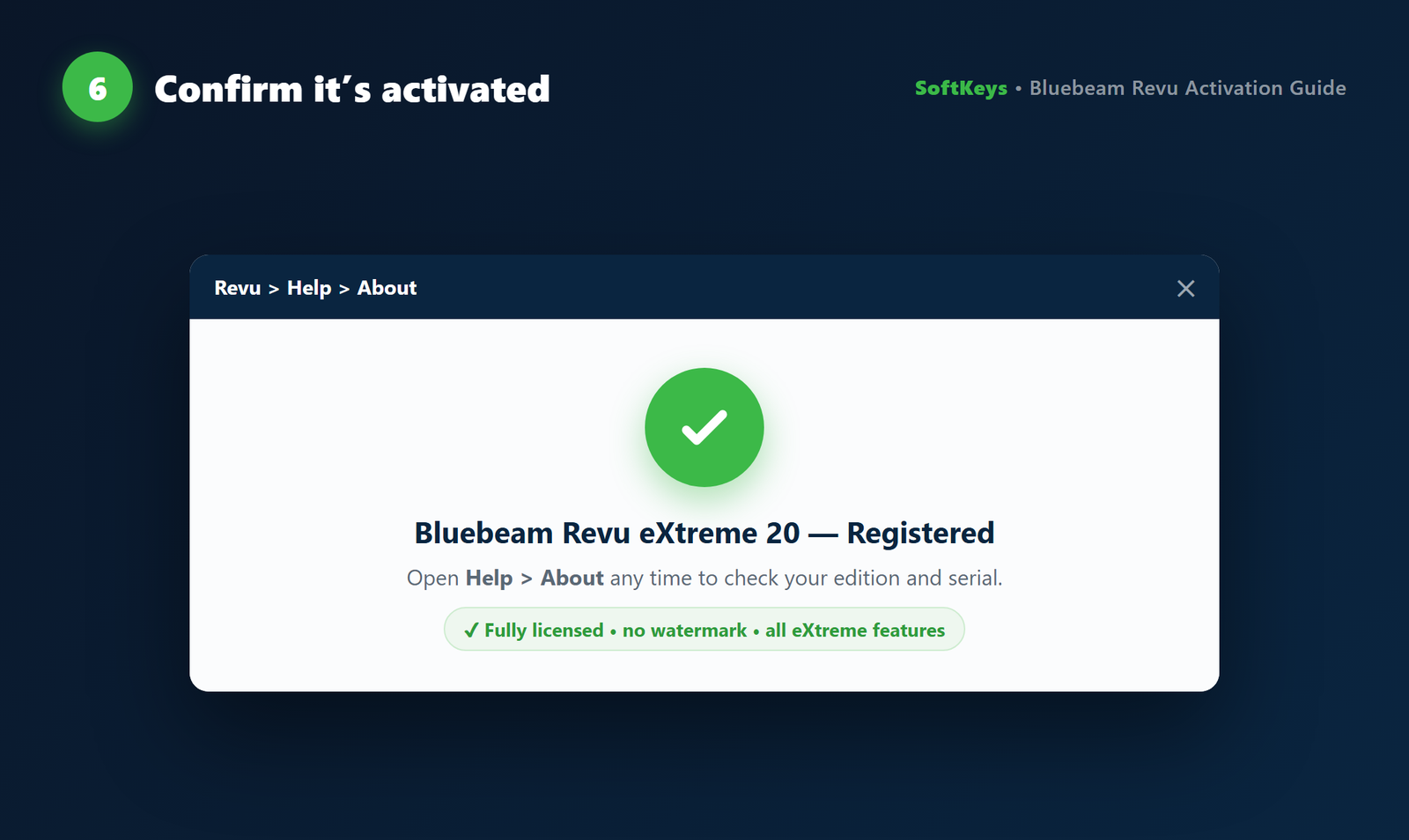
- 5. Confirm. You’ll get a success message and Revu opens fully licensed. Double-check any time via Help > Sobre, which shows your edition and serial.

Activating offline (manual method)
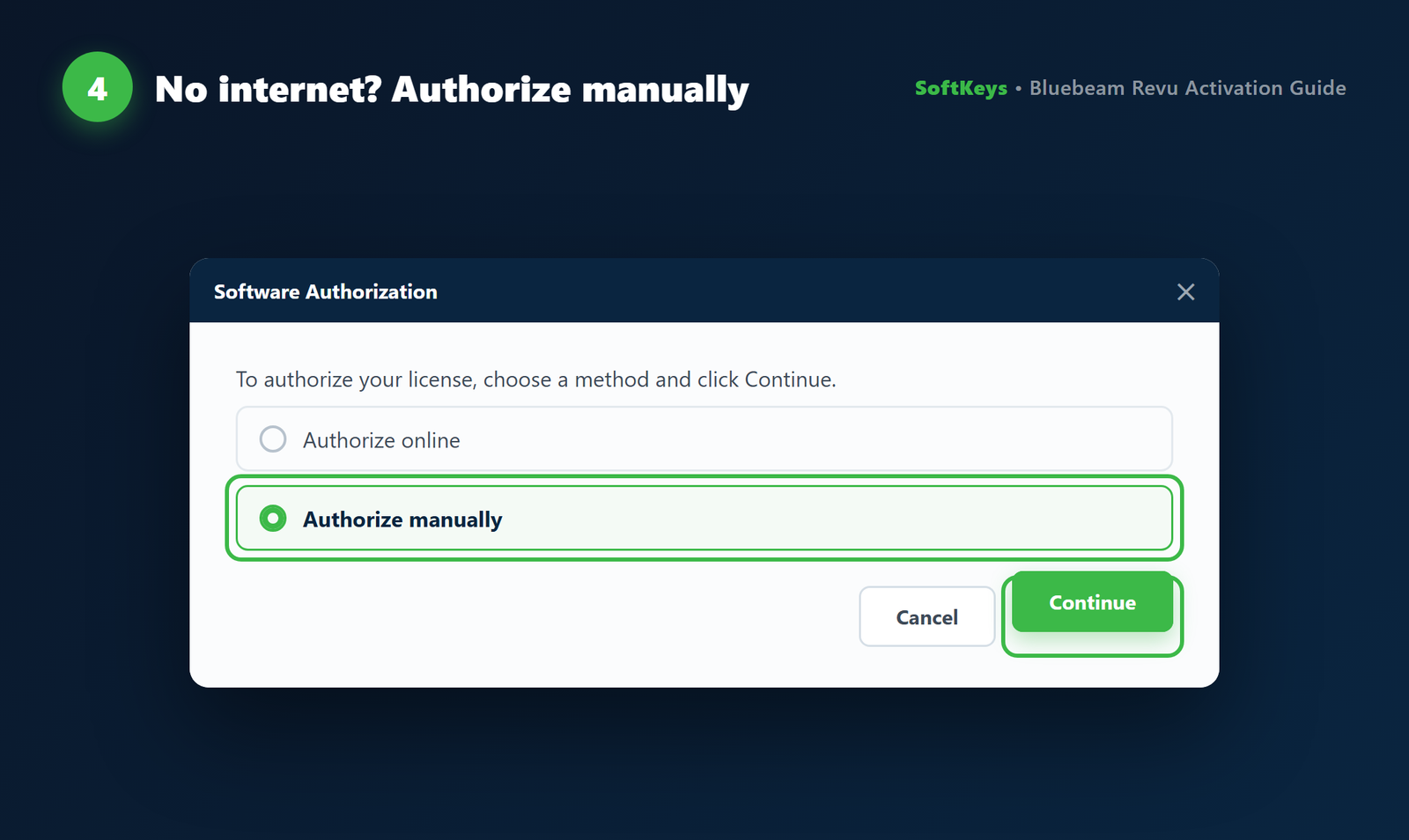
Building sites and secured office networks often block outbound connections, so Revu can’t reach the activation server. That’s what the manual method is for:
- In the registration window, choose Manual instead of the standard (online) option.
- Revu shows a Registration ID for that machine.
- On any device that does have internet, open Bluebeam’s manual registration page and enter your Serial Number, Produto Key and that Registration ID.
- You’ll be given an Activation Key — type it back into Revu and click Register.
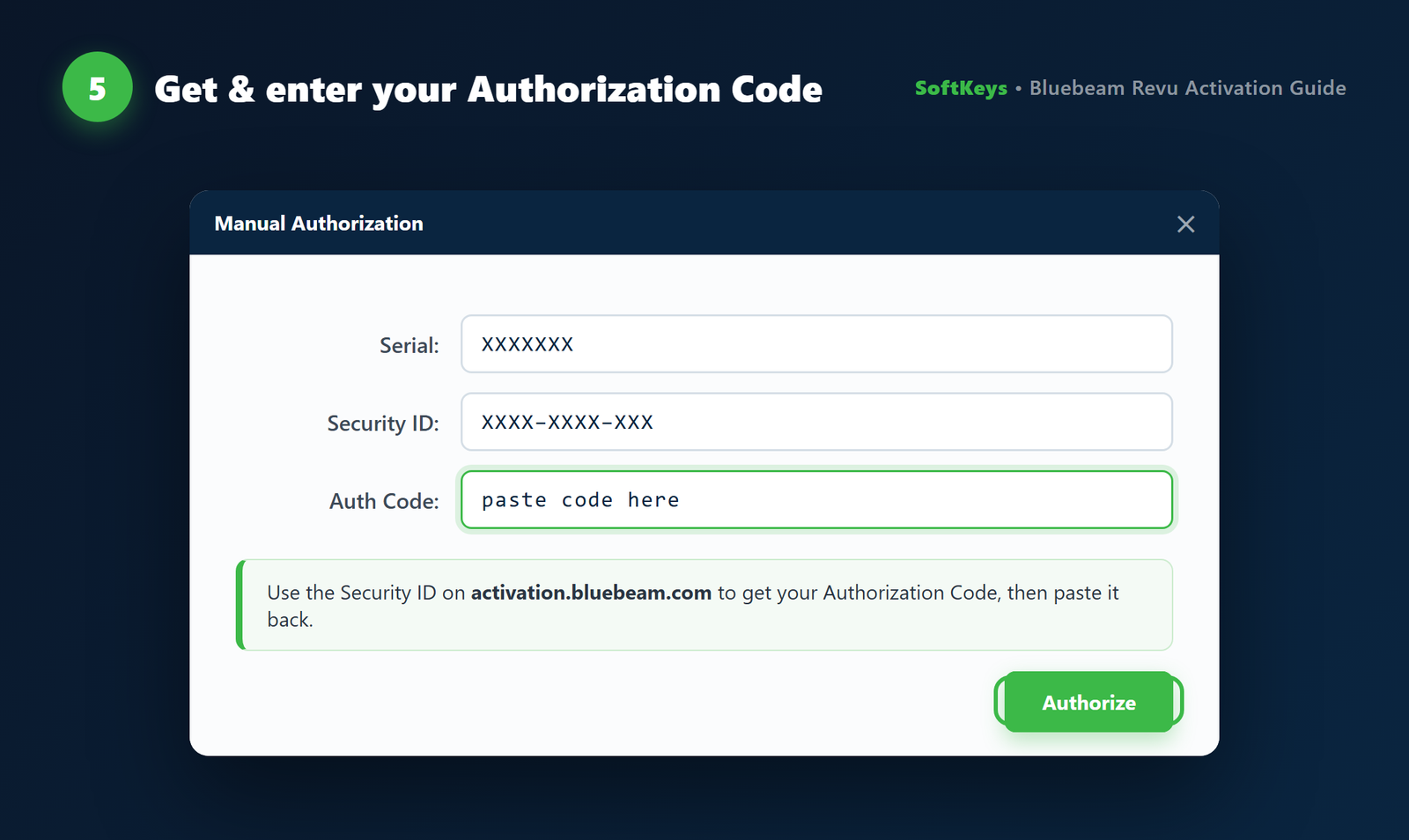
It’s a couple of extra minutes, but it lets you license a completely offline workstation.
Common activation errors & how to fix them
| Message | Why it happens | Fix |
|---|---|---|
| Invalid Serial Number / Produto Key | Typo, extra space, or wrong edition’s codes | Re-enter carefully — ideally paste from your email; confirm they’re the eXtreme 20 codes |
| Maximum activations reached | License is already active on another PC | On the old PC open Help > Unregister to free the seat, then activate here |
| Unable to connect to server | Firewall or no internet | Allow Revu through the firewall, or switch to Manual offline activation |
| Still running in trial / expired | Revu launched as a trial before codes were entered | Open Help > Register and enter your purchased Serial Number and Produto Key |
If a key genuinely won’t take, it’s almost always a source problem rather than a software one — here’s how to spot a fake license before it costs you.
Is a cheap Bluebeam Revu eXtreme 20 key genuine?
Yes — a genuine perpetual key activates the real Bluebeam software exactly the same way an expensive one does. The Serial Number and Produto Key talk to Bluebeam’s own servers; price has nothing to do with whether activation works. What does matter is buying from a seller that delivers valid, un-abused licenses (the difference between a real and a fake key is entirely about where you buy).
At SoftKeys a lifetime Revu eXtreme 20 key is $35.99, emailed within minutes with activation instructions:
📦 Genuine PDF & Markup Licenses


Frequently Asked Questions
Where do I find my Bluebeam serial number and product key?
In your purchase email from SoftKeys, delivered within minutes of buying. Every perpetual Revu license comes with both a Serial Number and a Produto Key — you need both to register.
Does Revu eXtreme 20 work on Windows 11?
Yes. Revu 20 installs and runs on both Windows 10 and Windows 11. There is no native macOS version — Mac users run it inside a Windows virtual machine.
Can I move my license to a new computer?
Yes. On the old PC open Help > Unregister to release the seat, then register on the new machine with the same Serial Number and Produto Key.
What’s the difference between Standard, CAD and eXtreme?
eXtreme is the full edition. On top of everything in Standard and CAD it adds scripting, batch OCR, PDF form creation, redaction and PDF/A export — the features power users and estimators rely on.
Is Bluebeam Revu 20 a subscription?
No. Revu 20 is a perpetual license you own outright. Newer Revu (21 and later) moved to a subscription model, which is exactly why many buyers prefer a Revu 20 lifetime key.
How long does activation take?
Online activation takes a few seconds. The manual/offline method takes a couple of minutes because you fetch an Activation Key from a second, internet-connected device.
Final thoughts
Activating Bluebeam Revu eXtreme 20 is genuinely a two-minute job: install, enter your Serial Number and Produto Key, click Register. The only real variable is where your license came from — a genuine key activates cleanly and stays activated. Comparing tools first? See our guide to the best cheap PDF software, and browse every genuine title at SoftKeys.